Just read more information about the PowerShell Summit Europe, to be held Sept 29-Oct 1st 2014, in Amsterdam (where there is quite a different meaning to the term: hash table).
Wish I could go! I'll have to hope that they will record sessions!
Thomas Lee's collection of random interesting items, views on things, mainly IT related, as well as the occasional rant
Just read more information about the PowerShell Summit Europe, to be held Sept 29-Oct 1st 2014, in Amsterdam (where there is quite a different meaning to the term: hash table).
Wish I could go! I'll have to hope that they will record sessions!
I’ve been sitting in the garden, my Windows phone in my pocket, and browsing the web on my Surface RT. where I read with great interest Satya Nadella’s recent mail to Microsoft Employees. Microsoft kindly posted this email this morning at http://www.microsoft.com/en-us/news/ceo/index.html. Not only a smart move making the email before Mary Jo managed to get a leaked copy, but the contents are very exciting.
I opined a bit over a year ago that Microsoft needed new management. A view that did me no favors in parts of Redmond. The whole devices, phones and games vs. Azure vs. the ‘what keeps Microsoft afloat (Windows, Office, SQL, Exchange, Lync)’ was simply confusing. And the Cone Of Silence imposed by folks no longer at Microsoft was leading to a very closed culture which IMHO was not helpful for the customer.
But things have changed and that Cone of Silence seems to be a thing of the past. Jeffrey Snover noted at TechEd, The PowerShell team at least is back to working in Internet time as two new exciting builds of PowerShell V5 the team pumped out this year so far.
In July last year, Steve Ballmer set out a new direction, devices and services. That there was a new direction was a really good thing, as was Microsoft’s overarching goal of One Microsoft. And his departure and replacement with Satya was another major change. To me, he’s more than just a safe pair of hands!
But there was still confusion – why lead with the two areas Microsoft has been weak with (consider the relative success of Zune, Kin, Surface RT, BPOS, to name but a few) when the cash cows and technological leaders (Windows and Office) were put in a distant second place. Satya notes that the ‘devices and services’ description was useful as a start, there is a need to hone on on a more detailed strategy (which is not so devices and services focused).
Today’s mail calls Microsoft ‘the productivity and platform company for the mobile-first and cloud-first world.’ To me this makes a log of sense and eliminates some of the confusion. It puts the platform in it’s place as just that, a platform. A platform to empower productivity. This approach seems to me to make a lot of sense. But as ever the devil is in the detail – Satya notes there is quite a lot of work to be done that will require nothing less than a complete transformation of Microsoft the company. That is a tall order, but the strategy sure seems sound.
The email also talks about the ‘Device OS.’ Which one is that going to be will be an interesting question for resolution. I personally love my Surface 1 RT. I use it daily as a device for consumption of content and some limited creation. Then there’s the Phone OS (I have Windows Phone 8.) It, too, has it’s moments. Finally, there is the traditional Windows as running on the Surface Pro and higher pc/server SKUs running on higher performance hardware. My use of traditional Windows is limited to my desktop and laptop, where I can type a whole lot faster than on the phone (and arguably more accurately). I think we have some interesting changes to the core product roadmap and I am looking forward to that being shared.
Microsoft is changing, and in a good way. The next couple of years is going to be very interesting. The Chinese curse: may you live in interesting times seems to have come home to roost! I look forward to the coming year.
$gps = $psISE.GetType().AssemblyThis code gets the GUI related resource strings held by the ISE and then weeds out all but he keyboard shortcuts. In the published script, I sort them to get a more effective list. On my system, I get the following:
$rm = New-Object System.Resources.ResourceManager GuiStrings,$gps
$rm.GetResourceSet((Get-Culture),$True,$True) | Where Value -CMatch "(F\d)|(Shift\+)|(Alt\+)|(Ctrl\+)"
PSH [C:\foo]: Get-ISEShortcut | ft -AutoSize value, name
Value Name
----- ----
Alt+Backspace EditorUndoShortcut2
Alt+Down EditorSelectNextSiblingShortcut
Alt+F4 ExitShortcut
Alt+Left EditorSelectEnclosingShortcut
Alt+Right EditorSelectFirstChildShortcut
Alt+Shift+Backspace EditorRedoShortcut2
Alt+Shift+Down EditorBoxSelectLineDownShortcut
Alt+Shift+H ToggleHorizontalAddOnPaneShortcut
Alt+Shift+Left EditorBoxSelectToPreviousCharacterShortcut
Alt+Shift+Right EditorBoxSelectToNextCharacterShortcut
Alt+Shift+T EditorTransposeLineShortcut
Alt+Shift+Up EditorBoxSelectLineUpShortcut
Alt+Shift+V ToggleVerticalAddOnPaneShortcut
Alt+Up EditorSelectPreviousSiblingShortcut
Ctrl+1 ShowScriptPaneTopShortcut
Ctrl+2 ShowScriptPaneRightShortcut
Ctrl+3 ShowScriptPaneMaximizedShortcut
Ctrl+A EditorSelectAllShortcut
Ctrl+Add ZoomIn1Shortcut
Ctrl+Alt+End EditorMoveCurrentLineToBottomShortcut
Ctrl+Alt+Home EditorMoveCurrentLineToTopShortcut
Ctrl+B BreakAllDebuggerShortcut
Ctrl+Backspace EditorDeleteWordToLeftShortcut
Ctrl+Break StopExecutionShortcut
Ctrl+C StopAndCopyShortcut
Ctrl+D GoToConsoleShortcut
Ctrl+Del EditorDeleteWordToRightShortcut
Ctrl+Down EditorScrollDownAndMoveCaretIfNecessaryShortcut
Ctrl+End EditorMoveToEndOfDocumentShortcut
Ctrl+F FindShortcut
Ctrl+F1 ShowCommandShortcut
Ctrl+F4 CloseScriptShortcut
Ctrl+G GoToLineShortcut
Ctrl+H ReplaceShortcut
Ctrl+Home EditorMoveToStartOfDocumentShortcut
Ctrl+I GoToEditorShortcut
Ctrl+Ins Copy2Shortcut
Ctrl+J ShowSnippetShortcut
Ctrl+Left EditorMoveToPreviousWordShortcut
Ctrl+M ToggleOutliningExpansionShortcut
Ctrl+Minus ZoomOut3Shortcut
Ctrl+N NewScriptShortcut
Ctrl+O OpenScriptShortcut
Ctrl+Oem6 GoToMatchShortcut
Ctrl+Plus ZoomIn3Shortcut
Ctrl+R ToggleScriptPaneShortcut
Ctrl+Right EditorMoveToNextWordShortcut
Ctrl+S SaveScriptShortcut
Ctrl+Shift+Add ZoomIn2Shortcut
Ctrl+Shift+D GetCallStackShortcut
Ctrl+Shift+End EditorSelectToEndOfDocumentShortcut
Ctrl+Shift+F9 RemoveAllBreakpointsShortcut
Ctrl+Shift+H HideHorizontalAddOnToolShortcut
Ctrl+Shift+Home EditorSelectToStartOfDocumentShortcut
Ctrl+Shift+L ListBreakpointsShortcut
Ctrl+Shift+Left EditorSelectToPreviousWordShortcut
Ctrl+Shift+Minus ZoomOut4Shortcut
Ctrl+Shift+P StartPowerShellShortcut
Ctrl+Shift+Plus ZoomIn4Shortcut
Ctrl+Shift+R NewRemotePowerShellTabShortcut
Ctrl+Shift+Right EditorSelectToNextWordShortcut
Ctrl+Shift+Subtract ZoomOut2Shortcut
Ctrl+Shift+U EditorMakeUppercaseShortcut
Ctrl+Shift+V HideVerticalAddOnToolShortcut
Ctrl+Space IntellisenseShortcut
Ctrl+Subtract ZoomOut1Shortcut
Ctrl+T NewRunspaceShortcut
Ctrl+U EditorMakeLowercaseShortcut
Ctrl+Up EditorScrollUpAndMoveCaretIfNecessaryShortcut
Ctrl+V Paste1Shortcut
Ctrl+W CloseRunspaceShortcut
Ctrl+X Cut1Shortcut
Ctrl+Y EditorRedoShortcut1
Ctrl+Z EditorUndoShortcut1
F1 F1KeyboardDisplayName
F1 HelpShortcut
F10 StepOverShortcut
F10 F10KeyboardDisplayName
F11 StepIntoShortcut
F11 F11KeyboardDisplayName
F12 F12KeyboardDisplayName
F2 F2KeyboardDisplayName
F3 F3KeyboardDisplayName
F3 FindNextShortcut
F4 F4KeyboardDisplayName
F5 F5KeyboardDisplayName
F5 RunScriptShortcut
F6 F6KeyboardDisplayName
F7 F7KeyboardDisplayName
F8 F8KeyboardDisplayName
F8 RunSelectionShortcut
F9 F9KeyboardDisplayName
F9 ToggleBreakpointShortcut
Shift+Backspace EditorDeleteCharacterToLeftShortcut
Shift+Del Cut2Shortcut
Shift+Down EditorSelectLineDownShortcut
Shift+End EditorSelectToEndOfLineShortcut
Shift+Enter EditorInsertNewLineShortcut
Shift+F11 StepOutShortcut
Shift+F3 FindPreviousShortcut
Shift+F5 StopDebuggerShortcut
Shift+Home EditorSelectToStartOfLineShortcut
Shift+Ins Paste2Shortcut
Shift+Left EditorSelectToPreviousCharacterShortcut
Shift+PgDn EditorSelectPageDownShortcut
Shift+PgUp EditorSelectPageUpShortcut
Shift+Right EditorSelectToNextCharacterShortcut
Shift+Up EditorSelectLineUpShortcut
I was pleased to see this recent article over on Petri.com. The article calls out some of the top PowerShell experts you can find on Twitter. I was pleased – as I was mentioned!
Ever watched someone who really know all the keyboard short cuts as they type along? I've watched some folks and they are blazingly fast. One reason is that they do indeed know all the short cuts! Ed Wilson has just published a cool article on the PowerShell Console shortcut combinations.
I have to say, there were some I did not actually know!
I've recently finished teaching a PowerShell course – and during the course we got into a long discussion on Profiles and how to best use them. With 4 or more (think ISE vs. Console, etc) profile files to pick from, what to you put into your profile file and which ones do you use? We had a lively discussion and decided that for the most part,just using Profile (this host, current user) is probably easiest as most systems have just one user logging in and that user (i.e. me/you) tends to just need two profiles (one for console and one for ISE).
But that leaves the question: what should I put into my profile. I just noticed a good Scripting Guys post showing what a number of Microsoft employees use in their profile files. This makes good reading, provides food for thought and has given me ideas of things I want to add to my profile. Happy reading.
I just notices that Cerebrata have brought out a set of cmdlets for Azure. For an introduction, see: http://www.cerebrata.com/products/azure-management-cmdlets/introduction. From here you can also download the cmdlet.
These cmdlets are, to say the least, NOT cheap. UK Price is over £80 pounds. I suppose if you are doing a lot of work with Azure and PowerShell this is good value. There are volume licensing options. Depending on your need, you may decide to use the Microsoft cmdlets and make up the difference yourself.
PowerShellGet and OneGet are two new technologies that Microsoft is introducing with PowerShell. In essence, OneGet enables you to find, install, and then use 'packages' from various package repositories (public and private). PowerShellGet enables you to find, install, and then use PowerShell Modules. These technologies are baked into PowerShell V5 preview releases and presumably will be part of PowerShell V5 when that finally ships. The repositories include places like Chocolatey, and a new repository for PowerShellGet, the PowerShell Repository (Https://msconfiggallery.cloudapp.net). The latter is a repository that is hosted on Azure.
There is some similarity between these two technologies in that both use Open Data Protocol (OData) to access and use the repositories. Stefan Stranger has just published a cool article showing how to use Odata to query for the repositories using OData. Stefan points out an Odata Profider, over on CodePlex. This provider enables you to access the various repositories using your normal DIR/CD cmdlets (well aliases!), like this (and click the graphic to see a bigger version!):
One nice touch to the Odata provider module – it comes with ah about_OData_Query help file that provides more information about the Odata provider. ALL add-in modules should do this.
It's great to see the wider software and hardware industry embracing PowerShell. Another company to do it is Sitecore, a web content management firm. Sitecore has just announced some PowerShell extensions you can take advantage of (assuming you use Sitecore). Read more about these cmdlets over on Mike Reynolds site. You can also download the actual cmdlets from SItecore's site.
One of the cooler things announced at this year's TechEd US was OneGet, a new public repository and supporting cmdlets for PowerShell modules. OneGet enables you to find and install useful PowerShell modules. This is pretty cool.
The initial repository is a public one - and that may not suit everyone. You may not want your users just loading stuff because they can. Likewise, you may not wish to publish corporate modules to a public repository, for any one of a number of reasons.
To resolve this problem, the PowerShell Team blog has just published a cool post, by John Slack, that describes how to setup an internal PowerShell Get repository. If you have a lot of modules and want to provide a self-service repository, this article shows you how. It also provides some additional background on PowerShell Get. This is great information which, imho, should be in any about_PowerShellGet help file. Sadly, there is no such help file as yet. We'll see if future versions of PowerShell include such a file.
One nice thing about TechEd, the contents are generally recorded and made available for download. This year, there's a cool PowerShell script to help you. Find out more about the idea over on the Windows IT Pro site, and go to the TechNet gallery to download the script.
When I first started getting into PowerShell, I browsed the TechNet and MSDN libraries to find samples that illustrated the use of various MS technologies. To get better at PowerShell, I then converted these MSDN/TechNet samples into PowerShell, posted them to the Microsoft site as well to my own http://pshscripts.blogspot.com blog site.
At the time I began doing this, there was a nice library page for both TechNet and MSDN which showed a tag cloud of the samples that had been tagged and a leader board showing who’d submitted the most updates. With the work noted above, I quickly took top spot – and slowly but surely created a huge gap between me and the next busiest contributors (at time I had contributed more content to the Technet site than the next 9 together). For reasons I’ve never been told, much of this was taken away – there is no leader board any more, the tag cloud(s) are gone and the ability to add community content is much diminished.
Having said that, today I noticed something that really made me happy. Real PowerShell samples in Technet. If you look at the page http://msdn.microsoft.com/en-us/library/aa394585(v=vs.85).aspx, you see a bunch of tasks you can undertake using WMI. In the days gone by, had added a bunch of samples here, recoding the VB script samples into PowerShell. What surprised me is that all MY samples are gone, but: there are now proper PowerShell samples included in some of the samples. Look, for example at http://msdn.microsoft.com/en-us/library/aa394600(v=vs.85).aspx – which shows using the registry – you can now see the samples where they belong.
In converting my samples to integrated samples, Microsoft has removed the attribution and has made some silly errors. For example, on http://msdn.microsoft.com/en-us/library/aa394600(v=vs.85).aspx?cs-save-lang=1&cs-lang=windows%2bpowershell#code-snippet-1 (on he first sample, $computer is defined but is not used for example). And someone has taken the attributes (like who wrote the sample) off.
It’s great to see samples using PowerShell being added into the TechNet library – long may this continue.
In a talk I'd never have imagined would happen, last week at TechEd US, Jeffrey Snover announced DSC for Linux. More information on that is provided on the Windows PowerShell team blog at: http://blogs.msdn.com/b/powershell/archive/2014/05/19/announcing-windows-powershell-desired-state-configuration-for-linux.aspx
While I don't know Linux well enough to provide a detailed comment, the resources shown in that post do not look like the complete set. Nevertheless, this is a great start. I look forward to hearing more and seeing additional resources being added.
Last week I had a wonderful opportunity to attend and speak at Spicework’s SpiceWorld London. It was a great 2-day event held at The Brewery, Chiswell Street in the city. I mentioned this event in my blog (see http://tfl09.blogspot.co.uk/2014/05/spiceworld-london-speakers-announced.html).
The event itself was lovely – it was fairly small and intimate. This allowed time and space to meet other delegates and to talk to the exhibitors. The Exhibition was also pretty good – I got to talk to some great companies and picked up some great take-aways. Thanks especially to Acronis for a full copy of their software, which is really, really useful. And thanks to HP for the really nice phone charger – as it turns out, I needed it for the train ride home.
My talk was entitled Bringing Home The Bacon – an Introduction to Windows PowerShell. I’ve uploaded the slides to SlideShare (http://www.slideshare.net/ThomasFLee/2014-spiceworld-london-breakout) and you are free to take a look. The talk is introductory to PowerShell, but I did spend time both in slides and in the talk making the case for PowerShell. I certainly persuaded many IT Pros to at least take a look, but there are always going to be some die hards who will only relinquish the GUI when it’s pried from their cold dead hands. I can see their point – although my view is simpler. There are two types of admin – those who just know the GUI and those who know the GUI and PowerShell. The latter are always going to be the ones making the bigger bucks.
One unique aspect of the event was the presence of all of the founders of Spiceworks, who were there both to talk to the attendees, but also to listen. I had several great conversations around the use of PowerShell in the SpiceWorks applications and how that might be achieved. It was utterly awesome to have a view (i.e. SpiceWorks needs a PowerShell interface) and have the very people who can deliver that there and listening. It was very refreshing.
Of course, any great conference had to have good parties and that was sure the case. The pre-party was held at a pub – which was just able to hold all the attendees. And the main party, held at The Vault, was pretty cool too, complete with a nice band.
I am looking forward to next year’s event already!
The Microsoft PowerShell team has just released an updated beta version of PowerShell Version 5. To give the release it’s full title, it is known as: Windows Management Framework 5.0 Preview May 2014. This update comes only a month after a prior release – showing that the PowerShell team sure can turn things around fast!
This update is available on http://www.microsoft.com/en-us/download/details.aspx?id=42936. The update consists of three files – two install packages (one for X86, the other for X64) and a small set of release notes.
In order to install it you must be running the LATEST OSs windows 8.1 or Server 2012 R2. According to the release notes, All versions of Windows 8.1 are supported, as are all versions of Server 2012 R2 (except Itanium [SIC as there IS no version of Server 2012 R2 for Itanium as per http://blogs.technet.com/b/windowsserver/archive/2010/04/02/windows-server-2008-r2-to-phase-out-itanium.aspx)]). I continue to find it curious that these betas are not supported on Windows 8 and Windows 7 (and related server products). I suspect that this may be a testing issue – testing takes time and as we know, to ship is to chose. Doesn’t really matter for me as my main servers and my laptop are up to spec. If nothing else, this decision is pushing me to upgrade to Server 2012 R2 on my development workstation – but before I do that, I need more RAM and a new disk so it’s going to have to wait a few weeks.
Installing this is easy – just navigate to the download site, get the download package and run it. Installing it on a Windows 8.1 system does not even require a reboot to do the install.
So what’s new?
Of course, there are bug fixes etc. – at least I expect so. But they aren’t mentioned. There are also included the same two big items in the first WMF preview: OneGet and the Network Switch cmdlets.
But the most exciting addition here is a new module: PowerShellGet. The Earlier WMF preview contained a module called OneGet, which helps you to find programs and packages in the external world. I used PSG to get me the Sysinternals tools, and a nice XML/HTML basic editor called bluefish.
PowerShellGet uses similar logic to find you new PowerShell modules. The module has just 4 cmdlets: Find-Module, Install-Module, Publish-Module, and Update-Module. Simple and elegant – and it works a real treat! It enables you to find modules, and then download and install them (and update them in due course).
The documentation does not really make clear where these modules come from, but with a bit of detective work, the modules are found and published from/to the PowerShell resource Gallery (https://msconfiggallery.cloudapp.net/).
In order to use Find-module, you need an external program, Nuget.exe (but the first time you use Find-Module you are nicely prompted for it). Once you download this, Find-Module finds a total of 52 modules, including some neat ones like PowerShellIseModule, TCPServer, and LocalUserManagement to name but a few). To install new modules requires administration rights.
Using this module looks like this:
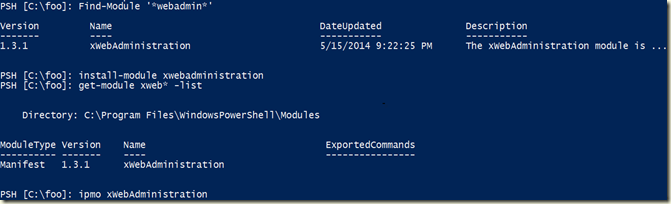
This is a nice touch – and I will certainly be exploring more of these modules.
All in all, this is a nice update.And it’s going to give me more work to do, especially in the area of PowerShell get. DSC is the other aspect I need to dig more into – and finding the dsc resource modules gives me more incentive!
I can’t wait to see what comes next?
IN a recent article on The Register, a user complains that the PowerShell 'terminal' sucks. The reader, also known as h4rm0ny, is a BASH user and finds the console limiting. He's probably right – but if he wants a better terminal, why not try the Integrated Scripting Environmnet, aka the ISE.
In the longer term, it would be nice for Microsoft to update the console (conhost.exe) to be rather more modern and to incorporate some of BASH's features. In the mean time, I'll just use the ISE which is good enough for me!
Just saw a cool presentation on using Visio and PowerShell. The slides and presentation here is a re-recording of a session the author, Saveen Reddy, gave at the recent PowerShell Summit in Redmond. You can get the video here: https://vimeo.com/94408016. You can also get the materials from: : https://onedrive.live.com/redir?resid=1FF099EDB1C7EBFA!87363&authkey=!ABRswDeQYGR-Xi8&ithint=folder%2c.psm1.
Some useful tips on using Visio and PowerShell!
Spiceworks is a free network management, monitoring, helpdesk, pc inventory and reporting solution. Produced by Spiceworks. But Spiceworks also has a very active technical support set of forums, including ones for Windows, VOIP, and of course PowerShell.
I’ve been contributing to Spiceworks since last autumn and am enjoying the place. I find the community a lot more supportive and a little less whiney than some of the other support boards. the place is very welcoming to newbies which I find especially good.
Every year, Spiceworks has a conference, SpiceWorld, which is held both in the US and in London. The conference is aimed at helping folks use the SpiceWorks app but also to be even more awesome IT Pros. AND, one feature that gets a lot of attention is the swag – I’m told I should bring an extra suitcase. This year’s London SpiceWorld is being held at The Brewery in Chiswell street on May 13-14. See http://www.spiceworks.com/spiceworld/london/ for the details.
Every year, one or two of the SpiceHeads (those of us active on the Spiceworks site) get asked to contribute. This year, it’s my turn and I’m going to be speaking about (ed: what else) PowerShell. My talk will be titled Bringing Home The Bacon With PowerShell with scripting and automation. It’s a short talk, I only have an hour, but I’ll be trying to cover the basics of PowerShell and looking more importantly at why every IT Pro should be keen to learn more.
I hope to see one or two of you there! http://www.spiceworks.com/spiceworld/london/